








Building or upgrading a computer can be an exciting yet overwhelming task. With countless options for each component, it’s important to know how to choose the right hardware. Whether you’re a casual user, gamer, or content creator, selecting the right parts will ensure optimal performance, efficiency, and longevity.
In this guide, we’ll walk you through the key factors to consider when choosing hardware components for your PC. From processors to storage, here’s what you need to know.
1. Understand Your Needs
What Will You Use Your PC For?
Before diving into the specifics of each component, think about your usage. Are you gaming, video editing, or working on general tasks like browsing and word processing? Your needs will dictate which components you prioritize.
-
Gaming: If you’re gaming, focus on a powerful CPU, high-performance GPU, and fast storage.
-
Content Creation: For tasks like video editing, you’ll need more cores in your CPU, more RAM, and possibly a workstation-grade GPU.
-
General Use: For everyday tasks, a mid-range CPU and GPU will suffice, along with a reasonable amount of RAM and storage.
2. Choosing a CPU (Central Processing Unit)
Intel vs. AMD: Which Should You Choose?
The CPU is the heart of your system, handling all the processing tasks. When it comes to selecting a CPU, you’ll mostly choose between Intel and AMD.
-
Intel: Known for excellent single-core performance, Intel processors are great for gaming and tasks that rely on high clock speeds.
-
AMD: AMD processors, especially the Ryzen series, excel in multi-core performance, making them ideal for multitasking, content creation, and workloads like video editing.
Consider the following when choosing a CPU:
-
Core Count: More cores are better for multitasking and heavy workloads. For gaming, 6-8 cores are usually sufficient, while content creators might want 8-12 cores.
-
Clock Speed: Higher clock speeds lead to better performance in games and tasks requiring single-core power.
-
Future-Proofing: Opt for the latest generation CPUs to ensure you have support for new technologies, like PCIe 4.0 or DDR5 memory.
3. Selecting a GPU (Graphics Processing Unit)
Why Is the GPU So Important?
The GPU is crucial for gaming, rendering, and video editing. A powerful GPU enhances visual quality and ensures smooth gameplay, especially in graphically demanding titles. Here’s what to consider:
-
NVIDIA vs. AMD: NVIDIA’s GeForce RTX series is well-regarded for gaming, offering ray tracing and DLSS technology for better visuals. AMD’s Radeon RX cards are often more affordable, offering solid performance, especially in 1440p gaming.
-
VRAM (Video RAM): The more VRAM your GPU has, the better it will perform in high-resolution games. Look for at least 8GB VRAM for 4K gaming.
-
Resolution and Refresh Rate: Pair your GPU with a monitor that suits your gaming needs. For 1080p gaming, a mid-range GPU like the RTX 3060 works well. For 4K gaming, opt for high-end GPUs like the RTX 4080 or RX 7900 XTX.
4. Choosing RAM (Random Access Memory)
How Much RAM Do You Need?
RAM is essential for smooth multitasking and ensuring your system doesn’t slow down when running multiple applications. The more RAM you have, the better your system will handle heavy applications and games.
-
8GB: Sufficient for general use and light gaming.
-
16GB: Ideal for most gamers and general users.
-
32GB or More: Necessary for heavy workloads like video editing, 3D rendering, or running virtual machines.
When choosing RAM, also consider the speed (MHz). Faster RAM (e.g., 3600MHz DDR4) can improve performance, especially in CPU-heavy applications.
5. Picking the Right Storage
SSD vs. HDD: What’s the Difference?
Storage plays a crucial role in load times, performance, and data management. You’ll typically need an SSD (Solid-State Drive) for fast read and write speeds, paired with a larger HDD (Hard Disk Drive) for bulk storage.
-
SSD: Offers fast boot times and game load times. NVMe SSDs are much faster than SATA SSDs.
-
HDD: Provides large capacity for less money. Use it for storing large files like videos, photos, and games.
Recommended storage setup:
-
Primary Drive (SSD): At least 500GB SSD for your OS and frequently used applications.
-
Secondary Drive (HDD): 2TB or more HDD for mass storage.
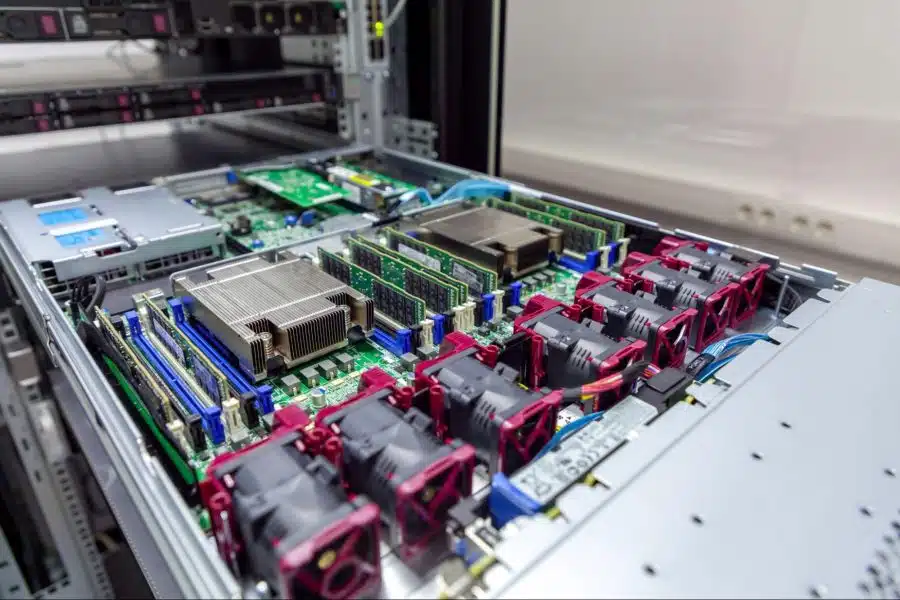
6. Choosing a Motherboard
How to Choose the Right Motherboard?
The motherboard connects all your components. When choosing one, consider compatibility with your CPU, RAM, and GPU.
-
Form Factor: Ensure your motherboard fits your case (e.g., ATX, Micro-ATX, Mini-ITX).
-
Socket Type: The CPU socket must match your processor (e.g., LGA 1200 for Intel, AM4 for AMD).
-
Chipset: The chipset determines which features your motherboard supports (e.g., PCIe 4.0, Wi-Fi 6, overclocking). For AMD, X570 and B550 chipsets are excellent choices.
For gamers, a motherboard with PCIe 4.0 support is ideal, especially if you plan to use a next-gen GPU.
7. Power Supply Unit (PSU)
How to Choose the Right PSU?
The PSU provides power to your entire system, so choosing the right wattage is crucial. Here’s how to pick:
-
Wattage: Choose a PSU with enough wattage to handle your components. A 750W PSU is generally good for most mid-to-high-end builds, while power-hungry systems might require 1000W or more.
-
80+ Certification: Look for an 80+ Bronze, Silver, Gold, or Platinum rated PSU for energy efficiency and reliability.
-
Modular Design: Modular PSUs allow you to use only the cables you need, reducing cable clutter.
8. Cooling: Air vs. Liquid Cooling
What Cooling Solution Do You Need?
Good cooling is essential to keep your system running smoothly. Overheating can reduce performance and shorten the lifespan of your components.
-
Air Cooling: Air coolers are cheaper and easy to install, with great options like the Noctua NH-D15 for high-end systems.
-
Liquid Cooling: Liquid cooling offers better cooling performance, especially for overclocked CPUs and GPUs. Look for an AIO (All-In-One) cooler like the Corsair iCUE H150i Elite.
If you’re building a high-performance system with heavy overclocking or a cramped case, liquid cooling is a solid choice.
9. Peripherals and Accessories
Don’t Forget the Extras
Once your main components are selected, don’t overlook peripherals like a monitor, keyboard, mouse, and headset. Here’s what to consider:
-
Monitor: Look for a high refresh rate (144Hz or higher) for gaming. For content creation, consider 4K resolution and color accuracy.
-
Keyboard and Mouse: Opt for mechanical keyboards and gaming mice with high DPI and customizable buttons for precision.
-
Headset: Choose a headset with good sound quality and a noise-canceling microphone for a better gaming experience.
Conclusion
Choosing the right hardware for your PC requires careful planning and consideration. Start by identifying your needs—whether for gaming, content creation, or everyday tasks. From there, select components that offer the best performance, compatibility, and future-proofing. By balancing your budget and requirements, you’ll be able to build a powerful, efficient PC that suits your needs for years to come.


